Background: Hacking Ferries
If you want, have a look at this TEDx Talk by Andy Stanford Clark, who is one of the inventors of MQTT. The talk is not so much about the MQTT protocol itself, but you'll get some context and background that may help you learn more in the following.
MQTT
MQTT is often used in situations where events should be sent from many sensors and broadcast to several applications. IBM and others for instance use MQTT so that IoT devices can send updates into their cloud services. When Facebook introduced their standalone Messenger application, they also relied on MQTT to push messages to the clients.
Optional: Read the article Building Facebook Messenger
MQTT is simple to work with, and the following are 5 reasons for using MQTT:
- MQTT is simple to debug. You can have extra clients during development that observe all communication. You can also manually send messages. This makes debugging much easier.
- You only need to handle a single IP address. That is the address of the broker. All other addressing happens indirectly via topics.
- Application startup is simple. You have to start the MQTT broker first, but clients can then connect in any order. The MQTT broker can also be hosted on a server and be always-on.
- MQTT works also behind NAT. NAT stands for network address translation, and is used when computers on a local network (like in your home) require a public address to communicate with other computers in a public network, like the internet. This translation of addresses means that a computer from outside your home cannot directly take initiative and communicate with a computer inside the network. But using MQTT with a broker outside the local network, it is also possible to "push" messages into a subscribed computer in the private network. Only the broker needs to be accessible.
- MQTT is bi-directional by default. Any client can send messages to any other client, at any time. You are not restricted to a client-server structure where only the client can initiate interactions.
Broker Architecture
MQTT is a protocol that is based on the client-broker topology. As a repetition, remember first the client-server architecture, as we have it for instance in HTTP:
Client-Server
Client-server: The client knows the address of the server. The server gets to know the client only after the client makes initial contact. Since only the client knows the address of the server initially, it is only the clients that can make the first contact and take initiative. In the world wide web, servers can host web sites and are contacted by browsers (the clients.) This is an example where there are many clients and only few servers, and where servers are optimized to server many clients. But there are also protocols in which the server is on a tiny sensor device, and "serves" the values of the sensor to any client that are interested in them.
Problems with Client-Server
Assume again a home automation system, in which a controller adjusts the heater (on/off) based on the temperature reported by several sensors that are distributed in the room. With HTTP, the two communication parts were client and servers, and the client can send data to the server or request data via the request-response pattern. We have hence two possibilities, depending on how we assign the roles of client and server:
-
HTTP, sensors act as clients: The sensors are HTTP clients and repeatedly send their temperature measurements to the heater, which is acts as an HTTP server.
-
HTTP, sensors act as servers: Vice-versa, we can think of a solution where each temperature sensor is a HTTP server, and the heater acts as a client. The heater makes requests to each sensor and asks for the current temperature, and then adjusts the heater based on all of the responses.
Assume now that not only the heater module is interested in the temperature, but also the controller for the window blinds. (If it gets very warm during the summer, it could move down the blinds to keep the sun down.) With the above solutions, what would that look like?
-
If the sensors should be the clients, then we now have to update all the sensor logic so that they not only send their measurements to the heater, but also the blind controller. Even worse, since all transmission cost energy, we roughly doubled the energy consumption of the sensor nodes, since the communication doubled. This makes that the batteries only last half as long!
-
If the sensors act as HTTP servers and we introduce the blind controller, they don't have to change their code. They just answer now double as many requests; the ones from the heater and the ones from the blind controller. For the battery life, this is equally bad as the solution above.
The problem with the above scenario is that we used a direct communication between the sensors and the control units, as shown in the figure below. Each sensor (in red) is connected to each controller.

This architecture connects each sensor with each client, which is not suitable.
New: Client-Broker
Now imagine a system where the components are more separate from each other, and do not communicate directly with each other. We can achieve this by introducing a component that decouples the sensors and the controllers. We call that component a broker, shown in the figure below:

This architecture introduces a broker, and sensors only connect to this broker.
Client-broker: A message broker is a server that distributes messages. Clients communicate with the server and send messages to the broker, which then get distributed to those clients that are interested in the events.
The broker is a generic component, which means that it is not specific for any application and that you can use the same broker for many different applications. You hence don't need to write your own broker, but can use an existing one and just configure it. There are several MQTT brokers available. The one we are going to use is called Mosquitto.
Message Pattern: Publish-Subscribe
With the new architecture of a broker also comes a new message pattern that is suitable for this architecture. It is called publish-subscribe.
-
The publish part is very simple: Whenever a client (here a sensor) makes an observation, it sends a message to the broker. We also say that the client publishes a message, or that the client acts as a publisher.
-
The subscribe part works as follows: Clients that are interested in a certain information subscribe to the broker. Whenever another client publishes that information, the broker forwards this message to all clients that have subscribed.
A minimal interaction looks as follows:
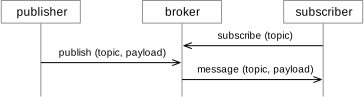
In MQTT, clients can be publishers or subscribers, or both. There can be any number of subscribers and any number of publishers in a system. Because of the publish-subscribe pattern, the subscribers do not have to know about the publishers, and the publishers do not have to know of the subscribers. They only have to know the address of the MQTT broker and connect to it.
For our home automation system, this enables an elegant and efficient solution: The sensors at as publishing clients that send their measurements to the broker. The controllers act as subscriber clients that subscribe to the broker for temperature updates. Once the broker receives the temperature updates, it forwards them to the controllers. When adding a new controller, it can just be a new subscriber that subscribes to the broker, but the communication and the behavior of the sensors does not change. Also, each sensor sends every measurement only once (to the broker), which helps to save energy.
Below you see an example with two subscribers. Only subscriber 2 receives the first published message. Subscriber 1 only receives it after it also subscribes.

Topics
Topics are used to define which information a subscriber is interested in, and match it with the information publishers provide. Usually, subscribers are not interested in all messages that all publishers send. Subscribers therefore only subscribe to specific topics, which depend on the application. The topics are organized in a hierarchy, separated by a slash ("/"). The following are examples for topics that an application for home automation could use:
The light l1 for instance subscribes to the topic
house/garage/lights/l1 so that it can receive messages that switch it
on or off. The passive infrared sensor pi1 publishes messages to the
topic house/garage/sensors/pi1 every time it detects a movement.
Topics are hence useful to structure the communication of an application. They are a mechanism that combines some aspect of addressing with that of message names. Central to the concept of topics is that several clients can listen to the same topic.
Example Application
An application to switch on the lights whenever a movement is detected can work like this: (In pseudo code)
subscribe to house/garage/sensors/pi1
whenever an MQTT message arrives at house/garage/sensors/pi1:
    send a message
        to house/garage/lights/l1 with payload "on"

    after some time, send a message
        to house/garage/lights/l1 with payload "off"
Quality of Service
Messages can be sent with three different quality-of-service (QoS) flags, which determine how much effort the broker and the clients spend on sending them:
-
QoS=0 is also called At most once. The message can get lost, and there will be no attempts to resend it.
-
QoS=1 is also called At least once. This means that the message will be eventually received, but that several copies of the message may appear due to duplication. The receiver has to detect any such duplicates.
-
QoS=2 is also called Exactly once. This guarantees the delivery and avoids any duplication.
You may ask: If QoS=2 is available, why would one ever use any of the lower QoS levels?
The answer is that the highest quality of service is also more expensive with regards to transmission effort. To send a single QoS=2 message, several messages on the underlying channel are necessary. Therefore, an application should always choose the lowest QoS level it can work with.
Below you see the diagrams that show how many control packages are involved to just send a single MQTT message, using QoS = 0.

For QoS=2, the protocol uses more control messages to transport a single MQTT message. This shows that there are more control messages involved the higher the QoS level is. This also means that it is more expensive for the network to transport MQTT messages with higher QoS level, as it uses more resources.
